Contact a Member Directly
## Overview
When you need to contact a member directly, you can use messages, email, or phone calls.
Use this for communication such as Point Reward follow-up, payment requests, and urgent notices.
Email and phone actions are available only when the member has the relevant contact information.
## Contact a Member by Message
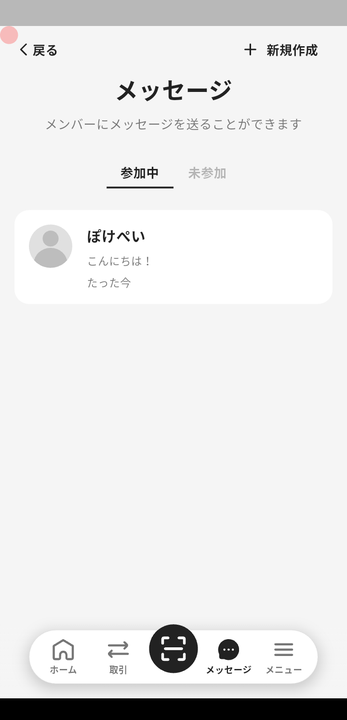
### From Message
1. Tap "Message" in the navigation bar.
2. Tap "New chat".
3. Select the member to start sending messages.
### From the Member List
1. Tap "Menu" in the navigation bar.
2. Tap "Members".
3. Select a member, then tap "Message" to send a message.
## Contact a Member by Email or Phone
Follow these steps to contact a member by email or phone.
1. Tap "Menu" in the navigation bar.
2. Tap "Members".
3. Select a member, then tap "Profile".
1. Use "Send email" to open an email app and create an email.
2. Use "Call" to open the phone app and call the member.
Overview
Section titled “Overview”When you need to contact a member directly, you can use messages, email, or phone calls.
Use this for communication such as Point Reward follow-up, payment requests, and urgent notices.
Email and phone actions are available only when the member has the relevant contact information.
Contact a Member by Message
Section titled “Contact a Member by Message”
From Message
Section titled “From Message”- Tap “Message” in the navigation bar.
- Tap “New chat”.
- Select the member to start sending messages.
From the Member List
Section titled “From the Member List”- Tap “Menu” in the navigation bar.
- Tap “Members”.
- Select a member, then tap “Message” to send a message.
Contact a Member by Email or Phone
Section titled “Contact a Member by Email or Phone”Follow these steps to contact a member by email or phone.
- Tap “Menu” in the navigation bar.
- Tap “Members”.
- Select a member, then tap “Profile”.
- Use “Send email” to open an email app and create an email.
- Use “Call” to open the phone app and call the member.
