Use Cashier Mode
## Overview
Use Cashier Mode when you run in-person transactions with members at the shop counter.
This is the basic flow for receiving payment or cash from a member and completing the transaction on the spot.
Cashier Mode supports charge transactions and payment transactions.
They also support Point Reward and gift issuance when those features are enabled.
The available actions depend on Pay settings, gift settings, contract status, and admin permissions.
## Use Cashier Mode
### Open Cashier Mode
Tap the scan icon in the center of the navigation bar.
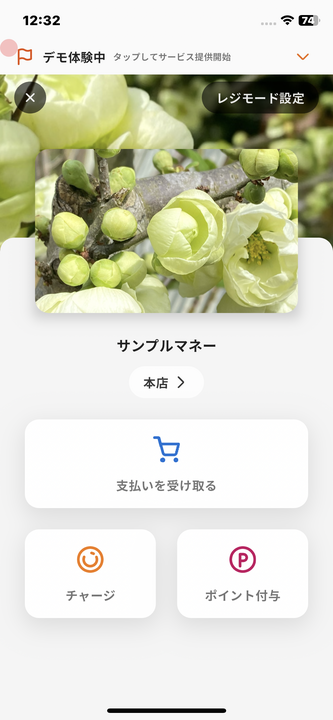
### Cash Charge
You can run a cash charge with the following steps.
1. Tap "Charge".
2. Enter the charge amount and tap the arrow.
3. Receive the cash from the member and tap "Continue".
4. Scan the member's QR code.
5. The charge is completed.
### Payment
You can run a payment with the following steps.
1. Tap "Receive Payment".
2. Enter the payment amount and tap the arrow.
3. Scan the member's QR code.
4. The payment is completed.
### Point Reward
You can directly send points to a member with the following steps.
1. Tap "Point Reward".
2. Enter the point amount.
3. Tap "Continue".
4. Scan the member's QR code.
5. The Point Reward is completed.
### Gift Issuance
You can issue a gift to a member with the following steps.
1. Tap "Gift".
2. Enter the gift amount and tap the arrow.
3. Tap "Continue".
4. Scan the member's QR code.
5. The gift issuance is completed.
Overview
Section titled “Overview”Use Cashier Mode when you run in-person transactions with members at the shop counter.
This is the basic flow for receiving payment or cash from a member and completing the transaction on the spot.
Cashier Mode supports charge transactions and payment transactions.
They also support Point Reward and gift issuance when those features are enabled.
The available actions depend on Pay settings, gift settings, contract status, and admin permissions.
Use Cashier Mode
Section titled “Use Cashier Mode”Open Cashier Mode
Section titled “Open Cashier Mode”Tap the scan icon in the center of the navigation bar.

Cash Charge
Section titled “Cash Charge”You can run a cash charge with the following steps.
- Tap “Charge”.
- Enter the charge amount and tap the arrow.
- Receive the cash from the member and tap “Continue”.
- Scan the member’s QR code.
- The charge is completed.
Payment
Section titled “Payment”You can run a payment with the following steps.
- Tap “Receive Payment”.
- Enter the payment amount and tap the arrow.
- Scan the member’s QR code.
- The payment is completed.
Point Reward
Section titled “Point Reward”You can directly send points to a member with the following steps.
- Tap “Point Reward”.
- Enter the point amount.
- Tap “Continue”.
- Scan the member’s QR code.
- The Point Reward is completed.
Gift Issuance
Section titled “Gift Issuance”You can issue a gift to a member with the following steps.
- Tap “Gift”.
- Enter the gift amount and tap the arrow.
- Tap “Continue”.
- Scan the member’s QR code.
- The gift issuance is completed.
