Check Transaction History
## Overview
Use Transaction History to check records of payments, charges, and other transactions.
You can also check Point Rewards, balance transfers, and gifts.
Use search, filters, and sorting as needed.
## Check Transaction History
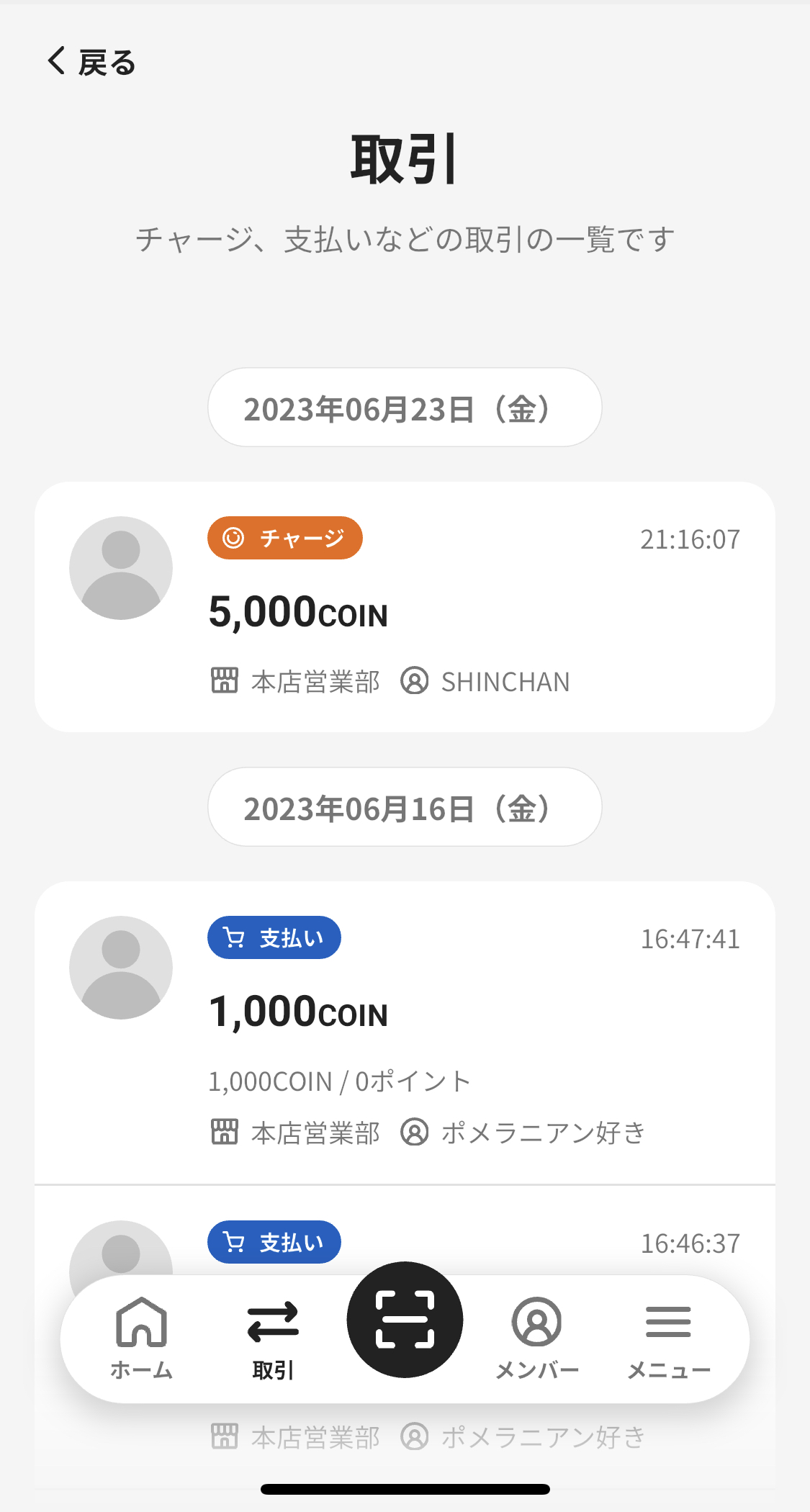
You can check transaction history with the following steps.
1. Tap "Transactions" in the navigation bar.
2. The transaction history list appears.
3. Select a transaction to check its details.
<div class="notion-gray-bg">
> ℹ️ Transaction types
>
> | Transaction type | Description |
> | --- | --- |
> | Charge | Charge through Cashier Mode |
> | Payment | Payment through Cashier Mode or a shop QR code |
> | Cancelation | Transaction cancellation |
> | Refund | Refund after ending e-money service |
> | Charge from Card | Charge from a credit card |
> | Point Reward | Point Reward through Cashier Mode |
> | Point Rebate | Automatic point rebate for a payment or charge, including [membership points](/en/help/app/initial-point-reward/) (identified by the campaign name on the transaction detail) |
> | Manual Charge | Manual Charge through Advanced Features |
> | Manual Payment | Manual Payment through Advanced Features |
> | Balance Expiration | Expiration of balance after the expiry date |
> | Transfer | Balance transfer between members |
> | Gift Issuance | Purchase of a gift |
> | Gift Issuance by Card | Purchase of a gift by credit card |
> | Charge from Gift | Charge from a gift |
> | Payment by Gift | Payment using gift balance |
>
> These transaction type names are also used when you [export files](/en/help/app/export-data/). Use them for transaction analysis and aggregation.
>
> In the app display, "Balance Expiration" is shown only on each member's transaction history screen from Menu -> Members -> Latest Transactions -> Show More.
</div>
Overview
Section titled “Overview”Use Transaction History to check records of payments, charges, and other transactions.
You can also check Point Rewards, balance transfers, and gifts.
Use search, filters, and sorting as needed.
Check Transaction History
Section titled “Check Transaction History”
You can check transaction history with the following steps.
- Tap “Transactions” in the navigation bar.
- The transaction history list appears.
- Select a transaction to check its details.
ℹ️ Transaction types
Transaction type Description Charge Charge through Cashier Mode Payment Payment through Cashier Mode or a shop QR code Cancelation Transaction cancellation Refund Refund after ending e-money service Charge from Card Charge from a credit card Point Reward Point Reward through Cashier Mode Point Rebate Automatic point rebate for a payment or charge, including membership points (identified by the campaign name on the transaction detail) Manual Charge Manual Charge through Advanced Features Manual Payment Manual Payment through Advanced Features Balance Expiration Expiration of balance after the expiry date Transfer Balance transfer between members Gift Issuance Purchase of a gift Gift Issuance by Card Purchase of a gift by credit card Charge from Gift Charge from a gift Payment by Gift Payment using gift balance These transaction type names are also used when you export files. Use them for transaction analysis and aggregation.
In the app display, “Balance Expiration” is shown only on each member’s transaction history screen from Menu -> Members -> Latest Transactions -> Show More.
