Enable Balance Remittance Between Members
## Overview
Balance Remittance lets members send balances to each other. Use it to encourage balance usage inside your e-money service.
When enabled, members can remit charged balance or point balance to family, friends, or other members.
## Enable Balance Remittance
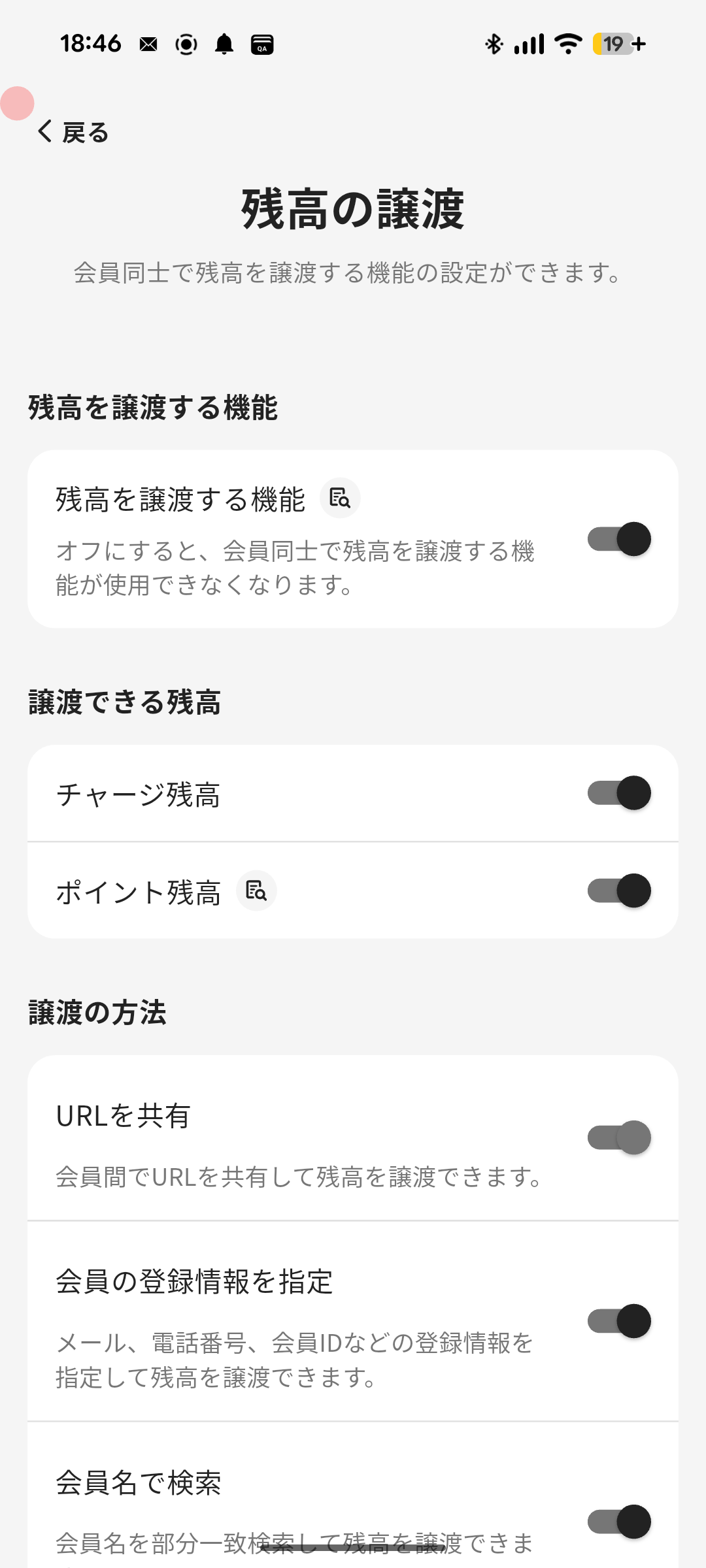
1. Tap **Menu** in the navigation bar.
2. Tap **Member Settings**.
3. Tap **Balance Remittance**.
4. Turn on **Enable balance remittance**.
5. Optionally change the balances available for remittance, remittance methods, and remittance limit, then save the settings.
## Settings
### Balances Available for Remittance
Choose at least one balance type.
- **Charge balance**
- **Point balance**
If points are off for the e-money, the point balance option is not shown.
### Remittance Methods
- **Share Code**
- Always on.
- Members can share a code to remit balances.
- **Search by member information**
- Members can remit balances by specifying email address, phone number, or other member information.
- **Search by member name**
- Members can search by partial member name.
- Use this only for private communities where members know each other.
### Remittance Limit
Set the maximum amount that can be remitted per transaction, or select no limit.
Overview
Section titled “Overview”Balance Remittance lets members send balances to each other. Use it to encourage balance usage inside your e-money service.
When enabled, members can remit charged balance or point balance to family, friends, or other members.
Enable Balance Remittance
Section titled “Enable Balance Remittance”
- Tap Menu in the navigation bar.
- Tap Member Settings.
- Tap Balance Remittance.
- Turn on Enable balance remittance.
- Optionally change the balances available for remittance, remittance methods, and remittance limit, then save the settings.
Settings
Section titled “Settings”Balances Available for Remittance
Section titled “Balances Available for Remittance”Choose at least one balance type.
- Charge balance
- Point balance
If points are off for the e-money, the point balance option is not shown.
Remittance Methods
Section titled “Remittance Methods”- Share Code
- Always on.
- Members can share a code to remit balances.
- Search by member information
- Members can remit balances by specifying email address, phone number, or other member information.
- Search by member name
- Members can search by partial member name.
- Use this only for private communities where members know each other.
Remittance Limit
Section titled “Remittance Limit”Set the maximum amount that can be remitted per transaction, or select no limit.
