What Should I Do If a Member Asks About Terms or Policies?
Overview
Section titled “Overview”Members agree to each set of terms when registering, and they can check them from the app at any time. Shops can also check the terms for their own e-money.
The Terms of Use and Privacy Policy are automatically generated based on the e-money settings.
They are generated based on documents prepared by Pocket Change, Inc. so that the necessary laws and regulations can be covered for the protection of both shops and members as consumers.
Specified Commercial Transactions Act information appears in the member app when Credit Card Charge is available and uses Pocket Change, Inc.’s information.
ℹ️ When e-money settings are changed, the changes are applied after a member notification period depending on the content.
How Members Can Check Terms from the Member App
Section titled “How Members Can Check Terms from the Member App”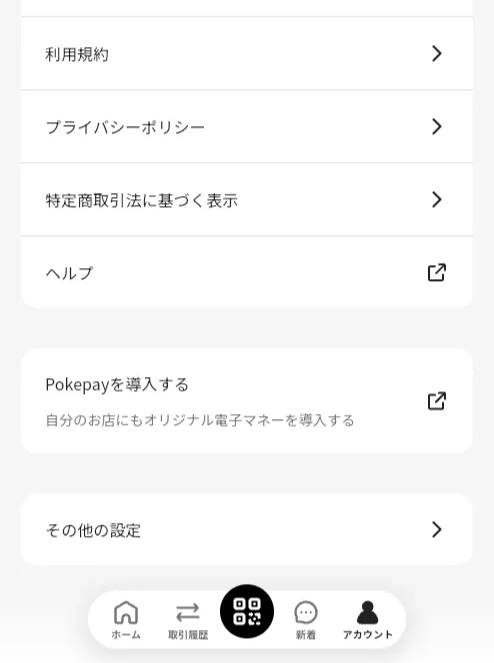
Members can check them with the following steps.
- Select Account from the bottom menu.
- Tap the item they want to check.
Specified Commercial Transactions Act information appears only when Credit Card Charge is available.
How Shops Can Check Terms from the Shop App
Section titled “How Shops Can Check Terms from the Shop App”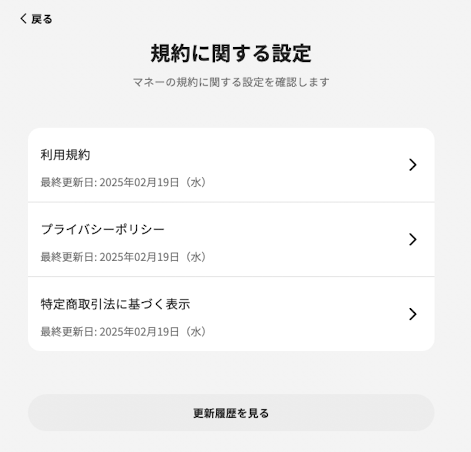
You can check them with the following steps.
- Tap “Menu”.
- Tap “E-money Settings”.
- Tap “Terms Settings” under other settings.
- Tap the item you want to check.
